

Help desk plan changes usually arrive in one of three forms: a higher per-agent price, a feature moved to a more expensive tier, or your current plan being retired. The detail that matters most is timing. A change to a monthly plan can show up on your next invoice. An annual contract normally holds your rate until renewal, and that gives you a window to export your data, re-cost your team, and decide whether to stay.
TL;DR:
- Most help desk plan changes are a price rise, a feature moved up a tier, or a retired plan. Each one calls for a different response.
- Your renewal date decides how much time you have. Monthly plans give you weeks, and annual plans usually give you months.
- Price your support team at its busiest month, not its quietest. Per-agent pricing hurts most during seasonal peaks.
- Under GDPR Article 28, a vendor that processes your customers' data must return or delete it when the service ends, at your choice.
- Grandfathered plans are usually a delay, not a solution. Use the time to plan your exit or your upgrade.
Table of Contents
- The Five Kinds of Plan Changes, and Which One Costs You Most
- Read the Notice: What Your Contract Actually Lets the Vendor Change
- Run the Numbers on Plan Changes Before Your Renewal Date
- Downgrading Without Losing Tickets, Macros, or Automations
- Your Data Rights When a Plan Change Pushes You Out
- Grandfathered, Upgrade, or Leave: Which Option We'd Pick
- Stop Absorbing Plan Changes: Own Your Help Desk for $299
- Frequently Asked Questions
- Sources
The Five Kinds of Plan Changes, and Which One Costs You Most
Help desk plan changes rarely say "price increase" in the subject line. They come as "new packaging," "simplified tiers," or "an updated plan lineup." To respond well, you first need to know which kind of change you are dealing with.
Per-agent price increases
This is the simplest change and the easiest to measure. Your seat price rises, and the bill grows with every person on the team. A rise from $15 to $19 per agent per month for five agents adds $240 a year. That sounds small, but it repeats every year, and the next increase will start from the new base.
Features moved to a higher tier
This change usually costs more than a price rise, and it is harder to see coming. A feature you rely on gets moved up a tier. Common examples are SLA timers, multiple support addresses, or reporting. Your plan price stays the same, but keeping your workflow now means upgrading every seat.
Plan retirement
Your plan is discontinued. Sometimes you are moved onto the closest new plan automatically. Sometimes you must pick one by a deadline. Either way, the feature list you signed up for no longer exists.
Free or starter plan cuts
Agent caps drop, or ticket history limits shrink. If your business runs on a free tier, this change can force a decision overnight.
Billing-cycle and add-on changes
Monthly billing gets more expensive compared with annual billing. Features that used to be included turn into paid add-ons. Your plan name stays the same, but your real cost rises.
A feature moved up one tier costs you that tier's price difference multiplied by every seat. That often makes it the most expensive change on this list.
Read the Notice: What Your Contract Actually Lets the Vendor Change
Most software-as-a-service terms include a clause that lets the vendor change prices or features with notice. The notice period and the trigger point matter more than the announcement email. Open your terms of service and look for three things: how much notice the vendor must give, whether changes apply mid-term or only at renewal, and whether you can cancel without penalty if you reject the change.
If you run a small business in Australia, you have specific legal protection. The Australian Competition and Consumer Commission explains that unfair terms in standard-form small business contracts have been illegal since 9 November 2023, and penalties now apply. Terms that let one party change the contract on its own are among the ACCC's examples of potentially unfair terms. Under the law, a small business has fewer than 100 employees or an annual turnover under $10 million.
Outside Australia, your contract is usually your main protection. Read it before you reply to the vendor, not after.
Pro Tip: Take a screenshot of your plan's feature page and current pricing page the day you subscribe, and save them with your invoice. When plan changes happen later, the vendor's old pages are often gone. Your saved copy is the only record of what "your plan" included. That matters if you need to claim grandfathered terms or dispute a forced migration.
Run the Numbers on Plan Changes Before Your Renewal Date

Do not judge a plan change by the per-agent figure in the email. Judge it by what your team costs across a full year, including your busiest month. Seasonal stores feel per-agent pricing most because they pay for peak headcount, or they spend time adding and removing seats.
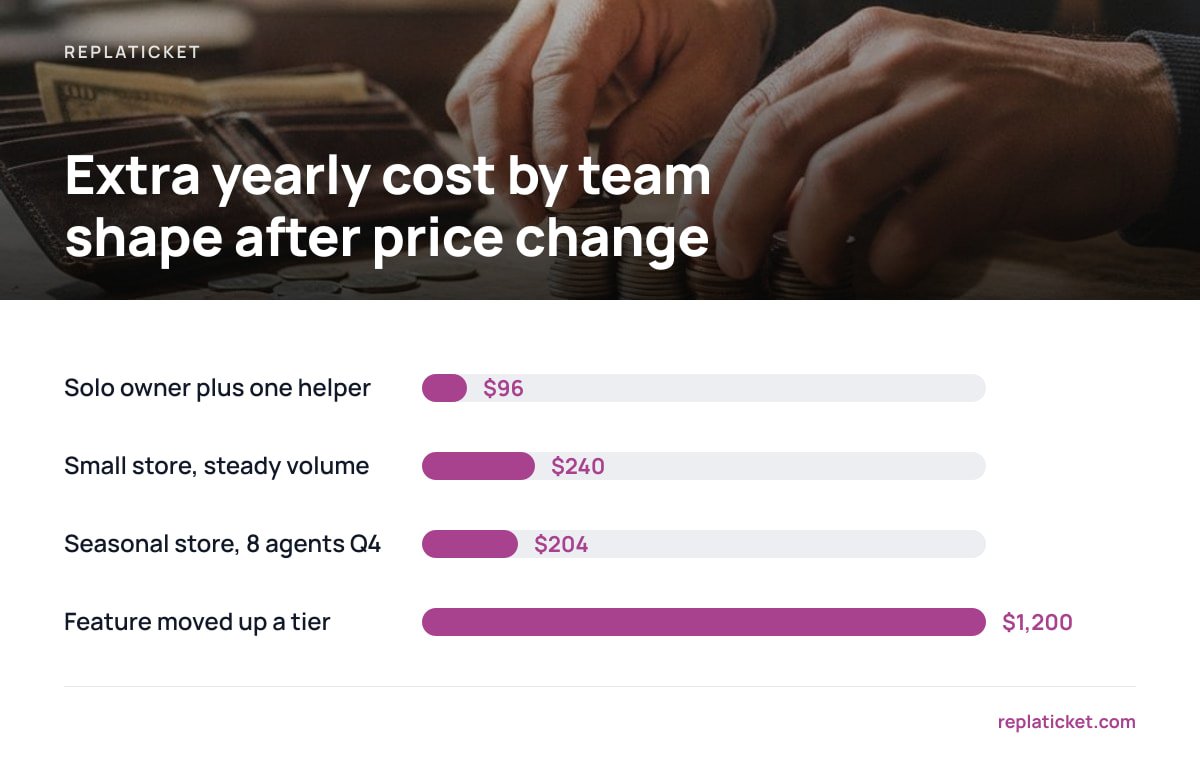
Here is how an illustrative price change plays out for three typical small teams. The prices are examples, not any vendor's actual rates.
| Team shape | Seats billed | Old cost ($15/agent/mo) | New cost ($19/agent/mo) | Extra per year |
|---|---|---|---|---|
| Solo owner plus one helper | 2 | $360/yr | $456/yr | $96 |
| Small store, steady volume | 5 | $900/yr | $1,140/yr | $240 |
| Seasonal store, 8 agents in Q4, 3 the rest of the year | 3 + 5 extra for 3 months | $765/yr | $969/yr | $204 |
| Feature moved up a tier ($15 → $35), 5 agents | 5 | $900/yr | $2,100/yr | $1,200 |
The last row is the one to worry about. When a feature you depend on moves up a tier, your annual cost can more than double even though the price of your old plan never changed.
Once you have the new annual figure, multiply it by three. Most small stores keep a help desk for years, not months. Three years is a fairer basis for comparing staying, downgrading, and moving to a one-time-cost tool.
Downgrading Without Losing Tickets, Macros, or Automations

Downgrading looks like the cheap option until you see what it removes. Before you click, list everything your team uses daily and check it against the lower tier's feature list.
- Automations and routing rules. Lower tiers often cap the number of rules or remove them entirely. Rules may be disabled rather than deleted, so you could lose them quietly.
- SLA policies. Missing first-reply and resolution targets means overdue tickets stop raising warnings. Nobody notices until a customer complains.
- Multiple support addresses. If you run several stores, losing extra mailboxes or brand settings means replies go out under the wrong name.
- Reports and history. Some tiers limit how far back reports go. Export the reports you need before the change, not after.
- Agent roles and permissions. Downgrades can remove role-based access and leave every agent able to see every store.
Export your tickets, contacts, canned replies, and report data before any downgrade takes effect. A full export costs you an hour. Rebuilding a year of macros from memory costs far more.
Your Data Rights When a Plan Change Pushes You Out
If a plan change makes you leave, your customer data has to go with you. Your contract sets the export terms. Data protection law adds a minimum on top of it.
Under Article 28 of the GDPR, a processor handling personal data for you must, at your choice, delete or return all of that data when the service ends. A help desk vendor storing your customers' emails and order questions is acting as a processor. If you or your customers are in the EU, the vendor cannot simply hold onto that history once you cancel.
The EU has also made switching software providers easier. The European Commission's Data Act overview explains that the regulation, which has applied since 12 September 2025, includes rules on switching between data processing services, including cloud software. The full text of Regulation (EU) 2023/2854 sets a maximum notice period of two months for a customer to start a switch. It also phases out switching charges entirely from 12 January 2027.
From 12 January 2027, providers covered by the EU Data Act can no longer charge you to switch to another provider.
These rules give you rights, but they do not move your data for you. You still need an export format your next tool can import, so test an export before you announce anything to your team.
Grandfathered, Upgrade, or Leave: Which Option We'd Pick
You have three realistic responses to plan changes. Here is how we would choose between them.
- Accept grandfathering if it is offered, but treat it as temporary. Legacy plans keep your price for now. They also tend to stop receiving new features, and they can be retired later at short notice. Use the time to prepare. Do not treat it as permission to stop thinking about the problem.
- Upgrade only if the higher tier fixes something you already need. If the new tier adds features you would have paid for anyway, the upgrade is a fair deal. If you are paying more just to keep what you had, it is not.
- Leave if the change exposes the pricing model itself. If your costs rise every time you hire for the holiday season or open a second store, the issue is the per-seat model, not this one increase. Another subscription will likely do the same thing.
Our view is simple. For a small team with steady needs, a recurring per-agent bill is a cost that grows every time the vendor revises its plans. If your workflow is settled, owning the software outright removes that pattern entirely.
Stop Absorbing Plan Changes: Own Your Help Desk for $299

Replaticket is self-hosted help desk software sold for a one-time $299 license. Because there is no seat price, adding three holiday agents costs nothing extra, and no plan revision can move features out of your reach. It gathers tickets from all your stores into one inbox, and each store keeps its own address, reply name, and color. You also get per-person store access, SLA first-reply and resolution targets with warnings, and per-store and per-person reports with a satisfaction score. The license includes complete source code, 12 months of updates, and 30 days of setup support.
The honest limit is that self-hosting makes you the operator. Replaticket runs on your own server, so backups, server security, and uptime are your responsibility. After the first 12 months of updates, check what ongoing updates will cost you. Read the requirements on our spec sheet before you buy, just as you would read any vendor's terms.
Frequently Asked Questions
What counts as a help desk plan change?
A plan change is any change to what your subscription costs or includes. Common examples are a higher per-agent price, a feature moved to a more expensive tier, a retired plan, or a new add-on charge. The plan name may stay the same while your real cost goes up.
Can a software vendor change my plan in the middle of a contract?
It depends on your terms of service. Many contracts let the vendor change prices or features with notice, but some apply changes only at renewal. In Australia, terms that let one party change a standard-form small business contract on its own can be challenged as unfair under the ACCC's rules.
What happens to my tickets if I downgrade my help desk plan?
Your ticket history usually stays, but features like automations, SLA policies, extra support addresses, and long-range reports may be disabled or capped. Export your tickets, macros, and reports before the downgrade takes effect so you keep a copy of everything.
Is a grandfathered plan worth keeping?
A grandfathered plan is worth keeping in the short term because it protects your current price. Legacy plans often stop receiving new features and can be retired later, though. Use the time to compare your options rather than assuming the price will last.
Do I have a right to get my customer data back if I leave?
Under GDPR Article 28, a processor such as a help desk vendor must delete or return personal data when the service ends, at the controller's choice. The EU Data Act adds rules that make switching providers easier. Outside the EU, your contract's export terms are your main protection.
Leave a Reply