

Help desk software is the shared inbox and ticketing system that turns scattered customer emails into trackable, assignable tickets with response deadlines. The real decision isn't which brand to pick — it's whether you rent that system per agent, per month, forever, or buy it once and run it on your own server. For a small team or a handful of stores, that distinction decides whether support costs $0 or $10,000+ a year once you count every agent seat.
TL;DR:
- Most help desk software bills per agent per month, so a 5-person team on a $39/agent plan pays roughly $2,340 a year — before any add-ons for SLAs or reporting.
- A one-time, self-hosted license moves the cost from recurring to fixed, but you take on the server, backups, and updates yourself.
- If you run multiple stores or brands, check whether the tool can route tickets to one inbox while keeping each store's own reply address and name — many plans charge extra for this.
- Data residency matters more than most buyers realize; under cloud SaaS, customer messages sit on a vendor's servers, not yours, which affects who can access them and where.
- Before buying anything, map your actual agent count across busy and slow seasons — that number, not the feature list, is what will make or break your cost comparison.
Table of Contents
- What Help Desk Software Actually Needs to Do for a Small Team
- The Real Cost of Per-Agent Help Desk Software
- Where Your Customer Data Actually Lives
- Features That Actually Matter for Multi-Store Teams
- Self-Hosted vs. Cloud Help Desk Software: The Honest Trade-offs
- How to Actually Evaluate Help Desk Software Before You Buy
- Get a Multi-Store Help Desk You Own Outright for $299
- Frequently Asked Questions
- Sources
What Help Desk Software Actually Needs to Do for a Small Team

Strip away the dashboards and the automation buzzwords, and help desk software does three things: it collects incoming support messages into one place, assigns them to a person, and tracks whether that person replied in time. Everything else — tags, macros, satisfaction surveys — is built on top of that core loop.
For a solo store owner, email alone can handle this for a while. The moment you add a second person, a second brand, or a seasonal hire, email breaks down fast. Nobody knows who answered what, two people reply to the same customer, and there's no record of how long anything actually took. That's the point where help desk software stops being a nice-to-have and starts being the only way the team doesn't step on itself.
The Real Cost of Per-Agent Help Desk Software

Nearly every mainstream help desk product prices by seat: a fixed dollar amount per agent, per month, scaling up as plans add features like SLA tracking, custom roles, or multi-brand support. That model works fine for a company with a stable headcount. It punishes small and seasonal teams, because you pay for every login whether that person works four hours a week or forty.
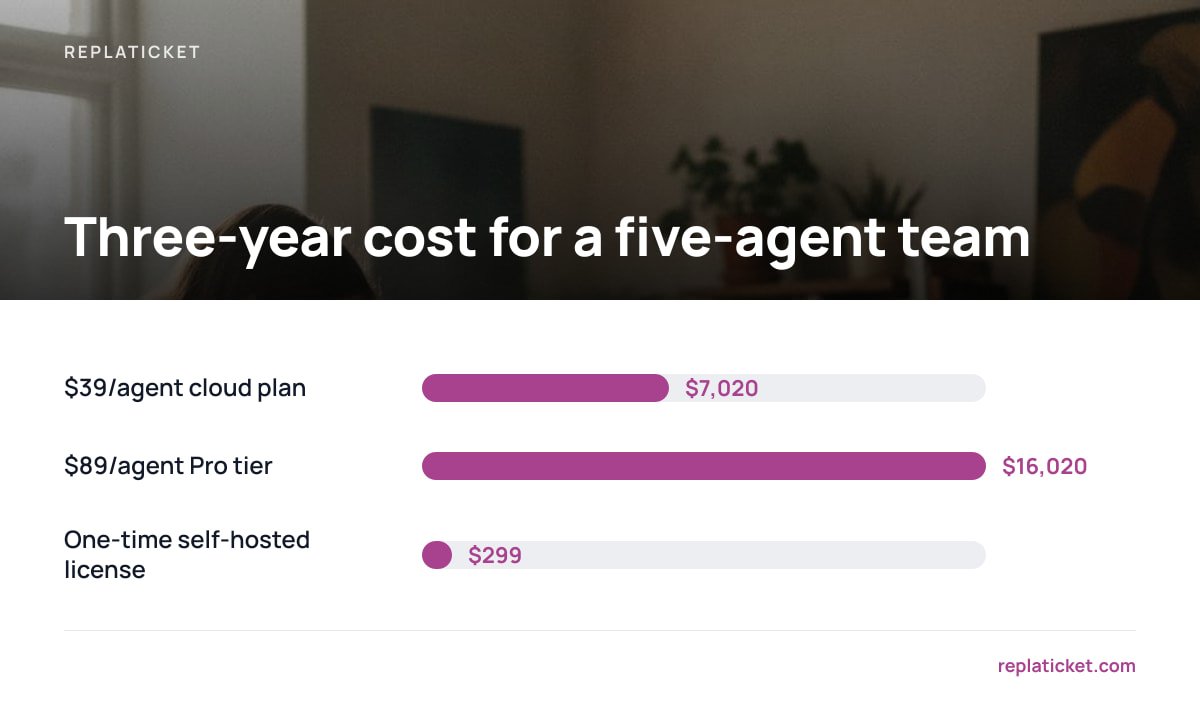
Here's what that looks like over three years for a five-person support team, using typical mid-tier per-agent pricing found across the category:
| Pricing model | Monthly cost (5 agents) | Year 1 total | Year 3 total | Who owns the data |
|---|---|---|---|---|
| Per-agent cloud plan ($39/agent/mo) | $195 | $2,340 | $7,020 | Vendor's servers |
| Per-agent cloud plan ($89/agent/mo, "Pro" tier with SLAs) | $445 | $5,340 | $16,020 | Vendor's servers |
| One-time self-hosted license ($299 once) | $0 ongoing | $299 | $299 | Your server |
$89 a month, five agents, three years: $16,020 for software that started as a single flat purchase price on the self-hosted side.
The gap widens every year you keep the subscription running, and it widens faster the moment you add agents during a sale, a launch, or the holidays — because most plans charge for every seat the day you add it, not just the seats you use steadily.
Where Your Customer Data Actually Lives

This is the part most buyers skip past, and it shouldn't be skipped. With a cloud help desk, every ticket — names, order numbers, complaint details — sits on the vendor's infrastructure, governed by their retention policy and their security practices, not yours. European Commission guidance on data protection makes clear that businesses handling customer data remain responsible for how it's stored and processed, even when a third-party vendor is doing the actual storing. If that vendor has a breach, your customers' data is involved in it.
That risk isn't hypothetical. Verizon's long-running Data Breach Investigations Report has repeatedly found that a meaningful share of confirmed breaches trace back to third-party systems and vendors rather than the company's own infrastructure. Self-hosting doesn't make you immune to security mistakes, but it does mean the attack surface is a server you control, not a shared multi-tenant platform holding thousands of other companies' tickets too.
Pro Tip: Before you compare any two help desk tools, ask each vendor one specific question — "Where is the data physically stored, and what happens to it if I cancel?" Cloud vendors answer this in a privacy policy page; self-hosted tools answer it by pointing at your own server. The clarity of the answer tells you more about the vendor than the feature comparison chart does.
Features That Actually Matter for Multi-Store Teams
Most feature lists bury the handful of things that genuinely change how a support team works day to day. For anyone running more than one storefront or brand, these are the ones worth checking before anything else:
- Unified inbox, separate identity. Tickets from every store should land in one place for your team, but replies need to go out under the right store's name, reply-to address, and even color coding — customers should never see "Store B" branding on a message from Store A.
- Per-person store access. A seasonal hire for one store shouldn't automatically see every ticket across every brand you run. Access needs to be assignable per person, per store, not all-or-nothing.
- SLA targets with visible warnings. A first-reply target of, say, 4 hours only matters if the system flags tickets approaching that deadline before they breach it, not after.
- Per-store and per-person reporting. You need to know which store is generating the most tickets and which agent is actually closing them, including a satisfaction score tied to resolved tickets — not just a total ticket count.
- Exportable, auditable history. If a customer disputes a resolution months later, you need the full thread, timestamps included, without digging through a vendor's support team to retrieve it.
Self-Hosted vs. Cloud Help Desk Software: The Honest Trade-offs
Neither model is free of downsides, and anyone telling you otherwise is selling something. Here's the trade-off laid out plainly:
| Factor | Cloud / SaaS help desk | Self-hosted help desk |
|---|---|---|
| Upfront cost | Low or $0 | Usually a flat license fee |
| Ongoing cost | Recurring, scales with agents | Fixed, doesn't scale with agents |
| Setup effort | Minimal, vendor-managed | You provision and maintain a server |
| Updates | Automatic | Manual, or time-limited included updates |
| Data location | Vendor's servers | Your server |
| Customization | Limited to vendor's roadmap | Full access if source code is included |
If your team is one or two people and you'd rather never think about a server, cloud software is the sensible choice, full stop. If you're running several stores, you expect to keep the tool for years, and the idea of a recurring bill for something as basic as a shared inbox bothers you, a one-time license is the better economic decision — provided you or someone on your team is comfortable running a small server, or you hire someone to do it once.
How to Actually Evaluate Help Desk Software Before You Buy
Skip the demo call until you've answered these for yourself:
- Count your real agent number across the year, not just today — include anyone who touches support during a sale or holiday rush.
- List every store or brand you support now and expect to add in the next two years, and check whether the tool bills extra per brand.
- Decide how long you plan to keep the software. A tool you'll use for one year favors a subscription; a tool you'll use for five favors a one-time purchase.
- Ask who can see your data, specifically, and get that answer in writing before signing anything.
- Check whether SLA tracking and reporting are included in the base price or locked behind a higher tier — this is where subscription costs balloon fastest.
Get a Multi-Store Help Desk You Own Outright for $299
If the math above convinced you that per-agent billing doesn't fit a small or seasonal team, Replaticket is built for exactly that gap. It's self-hosted help desk software for a one-time $299 payment — complete source code included — that pulls tickets from every store or brand you run into a single inbox while keeping each store's own reply name, color, and address intact for customers. You get per-person store access, SLA first-reply and resolution targets with breach warnings, and per-store and per-person reports with a satisfaction score, all without adding a dollar to the bill as you add agents.
The honest caveat: you need somewhere to run it — your own server or a basic VPS — and the $299 covers the license, 12 months of updates, and 30 days of setup support, not indefinite free hosting or support beyond that window. If you want help desk software you'll still be using in year four without a recurring invoice, check the spec sheet against your own setup first; it's built for teams who are fine trading a little server responsibility for owning the thing outright.
Frequently Asked Questions
What's the difference between help desk software and a shared email inbox?
A shared inbox just forwards messages to a group of people, with no record of who's handling what or how fast. Help desk software converts each message into a ticket with an owner, a status, and usually a response deadline, so nothing gets answered twice or missed entirely.
Is self-hosted help desk software harder to set up than cloud software?
Yes, slightly — you need a server and someone comfortable installing and maintaining software on it, where cloud tools require only a signup. In exchange, you avoid recurring per-agent fees and keep full control over where customer data lives.
How many agents justify buying help desk software instead of using email?
Most teams feel the pain at two or three people handling the same inbox, when duplicate replies and missed messages start happening regularly. If you're adding seasonal staff during sales or holidays, that's usually the tipping point even for a solo-run store.
Can one help desk system handle multiple stores or brands?
Many can, but check whether each store keeps its own reply-from address and name when a ticket is answered, or whether everything goes out under one generic identity. This is a common extra-cost feature on subscription plans and worth confirming before you commit.
Does a one-time license mean no future costs at all?
Not entirely — you're still responsible for server hosting costs and, eventually, for updates once any included update period ends. The difference is that those costs are small and predictable compared to a per-agent bill that grows every time you hire.
Leave a Reply