

A support ticket system turns every customer email, form submission, or chat into a tracked ticket with an owner, a status, and a history, so nothing gets answered twice or not at all. For a small store team, feature lists matter less than how you pay. Per-agent monthly pricing grows with every hire and every seasonal temp. A one-time license on your own server stays flat, but you take on the hosting.
TL;DR:
- A ticketing system assigns every customer message an owner, a status, and a history. A shared inbox can't do that once three or more people answer email.
- Per-agent pricing is the cost that keeps growing. Four agents at $55 a month comes to $2,640 a year before any add-ons.
- Free tiers usually cap agents, strip reporting, or lock out automation. Check them against your busiest month, not your quietest.
- Self-hosting gives you a flat cost and keeps customer data on your server. In return, you are responsible for updates, backups, and TLS.
- Most ticketing faults trace back to email: broken threading headers, failed SPF/DKIM checks, or auto-reply loops. They can be fixed in an afternoon.
Table of Contents
- What a Support Ticket System Does, and Where a Shared Inbox Breaks
- The Five Kinds of Ticketing Tools on Every "Best Of" List
- How Much a Ticketing System Costs Over Three Years
- Free Support Ticket Systems: What "Free" Usually Leaves Out
- Features That Matter for a Small or Multi-Store Team
- Self-Hosted vs. Cloud: Who Should Own the Server
- How to Troubleshoot a Ticketing System: Six Common Faults and Their Fixes
- Run Every Store From One Inbox for a One-Time $299
- Frequently Asked Questions
- Sources
What a Support Ticket System Does, and Where a Shared Inbox Breaks
Ticketing tools are software that take incoming customer messages (email, contact forms, sometimes chat or social DMs) and turn each one into a record. That record has one owner, one status, a timestamp, and a full conversation history. The point is accountability. At any moment you can see what is open, who has it, and how long the customer has been waiting.
A plain shared mailbox does none of this. It works fine for one or two people. At three, the failures start. Two agents reply to the same angry customer with different refund amounts. A message gets marked read by someone who meant to come back to it and never did. Nobody can say how long customers wait for a first answer, because nothing records it. Our breakdown of when a shared inbox works and when your team outgrows it covers the warning signs in more detail.
A ticket system fixes this by adding four things a mailbox lacks:
- Assignment. Each ticket belongs to one person, so you never get duplicate replies or orphaned threads.
- Status. Open, pending, and solved tell you what still needs work without anyone rereading the thread.
- Timers. First-reply and resolution clocks turn "we're pretty fast" into a number you can manage.
- History. Every past conversation with a customer sits in one place. The person answering today sees what was promised last month.
The Five Kinds of Ticketing Tools on Every "Best Of" List
Ask for popular helpdesk platforms and you'll get lists of 10 to 13 brand names. Most of them fall into five categories, and the category tells you more than the brand does. Once you know which category fits your team, the shortlist shrinks to two or three options.
| Type | How you pay | Data lives | Best fit | Main catch |
|---|---|---|---|---|
| Cloud help desk suite | Per agent, per month | Vendor's servers | Teams of 10+ needing many channels | Cost grows with every seat |
| Help desk bundled into a CRM or project tool | Per user, often tiered | Vendor's servers | Teams already living in that tool | Ticketing is a side feature |
| Shared inbox add-on | Per user, per month | Vendor's servers | 2–4 people, one brand | Weak SLAs and reporting |
| Open-source self-hosted | Free license, your time | Your server | Technical teams with spare hours | Setup and upkeep are on you |
| Commercial self-hosted, one-time license | Single payment | Your server | Small teams, multiple stores | You still maintain the server |
The cloud suites dominate the ranking lists because they have the most features and the biggest affiliate programs. That doesn't make them the right pick for a three-person team running two stores. Most of the features you'd be paying for (voice routing, workforce management, AI deflection tiers) are built for 50-seat contact centers.
How Much a Ticketing System Costs Over Three Years

Pricing pages show a monthly per-agent figure because it looks small. The number that matters is the three-year total for your actual team, including the extra people you bring in for peak season.
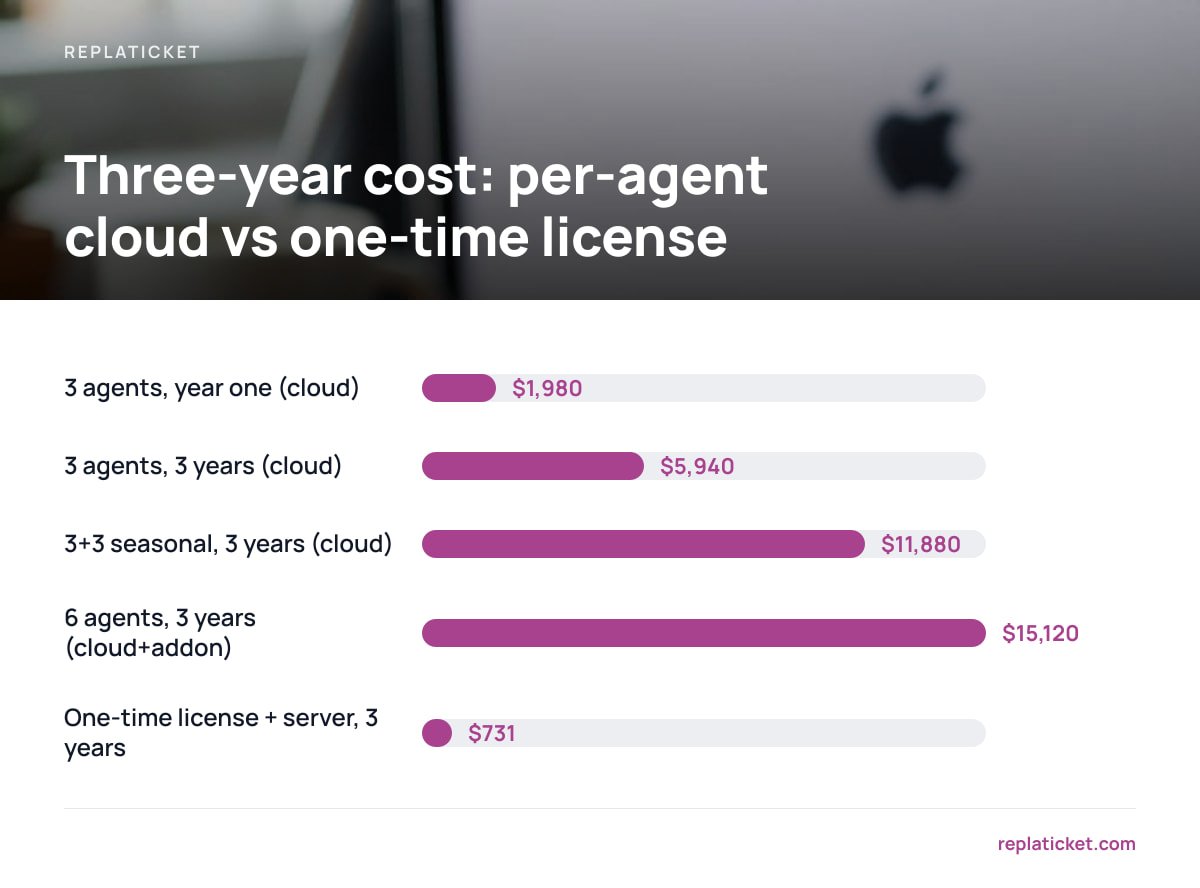
Per-agent plans from the large cloud vendors commonly range from about $15 at the entry level to $100 or more per agent per month on tiers that include SLAs and proper reporting. The features small teams actually need tend to sit in the middle tiers. Here is the arithmetic for a mid-tier plan at $55 per agent per month, against a one-time license with a modest virtual server:
| Scenario | Per-agent cloud ($55/agent/mo) | One-time license ($299) + $12/mo server |
|---|---|---|
| 3 agents, year one | $1,980 | $443 |
| 3 agents, three years | $5,940 | $731 |
| 3 agents + 3 seasonal (billed all year), three years | $11,880 | $731 |
| 6 agents, three years, with a $15/agent/mo add-on | $15,120 | $731 |
Six agents on a $55 plan for three years costs $11,880. The same team on a one-time license and a $12 server costs $731.
The self-hosted column leaves out your time, and that is a real cost. Expect a few hours to set it up and an hour or so a month for updates and checking backups. Even if you value that time generously, the gap is large. For a worked example using one well-known vendor's published pricing, see our breakdown of what a small store team actually pays per year.
Pro Tip: Count seat-months, not seats. Many per-agent plans bill annually, and some don't let you remove a seat until renewal. If you add three temps for November and December, you may pay for 36 seat-months to get 6 months of work. Before you sign, ask the vendor in writing whether seats can be reduced mid-term.
Free Support Ticket Systems: What "Free" Usually Leaves Out
Free ticketing tools exist and some are good. But "free" almost always comes with conditions designed to push you onto a paid plan just as you start depending on the tool. Common limits include:
- Agent caps. Free tiers are often limited to one to three agents. Your first seasonal hire pushes you over.
- Missing SLAs. First-reply and resolution targets are usually a paid feature, even though they're the main reason to leave a shared inbox.
- Thin reporting. You get ticket counts but not per-person or per-brand breakdowns, so you can't tell which store generates the work.
- One mailbox. Connecting a second store's address often requires an upgrade.
- Branding. Replies may carry the vendor's footer, which looks odd on a store that sells premium goods.
Open-source self-hosted tools are free in a different way. There's no license fee, but you handle installation, upgrades, and security yourself, often with community forums as your only support. If someone on your team is comfortable on a Linux server, that can work well. If not, the hours add up quickly.
Test any free tier against your busiest month, not a quiet one. If it can't handle December, it isn't really free for you.
Features That Matter for a Small or Multi-Store Team

Most feature comparisons treat all help desks as interchangeable checklists. For a small e-commerce operator, five features decide whether the tool helps or gets in the way.
One inbox, many store identities
If you run more than one store, you want every ticket in one queue. Each reply should still go out from that store's address and under that store's name. A customer who bought from your candle shop shouldn't get a reply signed by your pet-supply brand. Our guide to comparing support inboxes for multi-store teams goes through what to test, and running multiple Shopify stores covers the operational side.
Per-person store access
Your seasonal temp probably shouldn't see every brand's refund history. Look for permissions that limit each person to specific stores, not just a broad admin-or-agent role.
SLA targets with warnings
A timer is only useful if it warns someone before a deadline passes. Set a first-reply target you can actually hit, then tighten it. Our article on measuring first response time and setting a real target explains how to choose a starting number.
Per-store and per-person reports
You need to know which store produces the most tickets and who is closing them. Without per-store reporting, you can't tell whether a spike comes from a shipping problem at one brand or growth across all of them.
A satisfaction score you can trust
A simple one-question rating after a ticket closes is enough. On a small team, read it carefully, because a handful of responses can swing the percentage. Our CSAT score guide shows how to read small samples without overreacting.
Features you can usually skip at this size: AI chatbots, phone routing, workforce scheduling, and anything sold as an "omnichannel" add-on.
Self-Hosted vs. Cloud: Who Should Own the Server
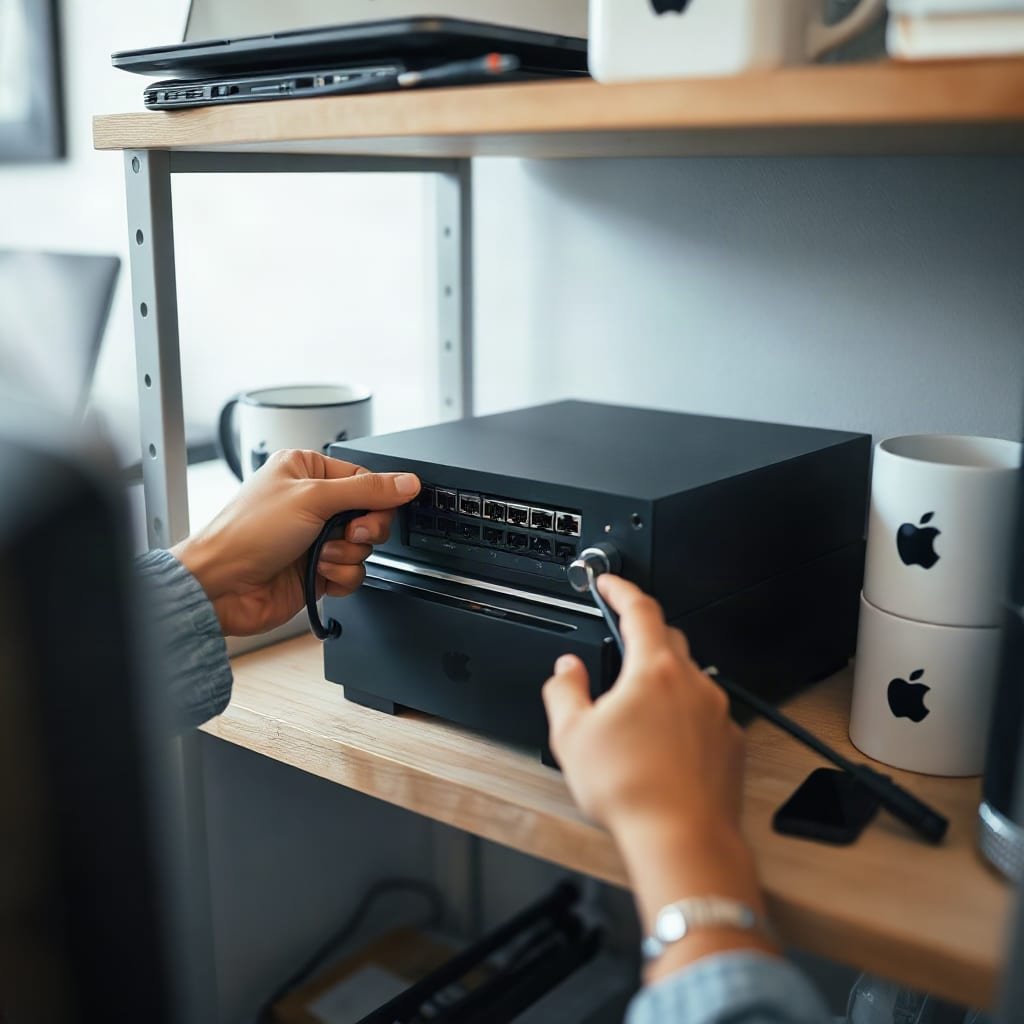
With a cloud help desk, the vendor stores every customer name, address, order number, and complaint you've ever received. Under the EU's General Data Protection Regulation, that vendor is a processor acting on your behalf. Article 28 requires a contract governing how it handles the data, and you remain responsible as controller. Self-hosting doesn't remove your obligations, and your hosting company is still a processor. What it does is shorten the chain of parties holding your customers' data and put deletion, retention, and export directly in your hands.
The trade-off is real, and you should weigh it honestly:
- You patch it. Article 32 of the GDPR requires security appropriate to the risk. On your own server, that means applying updates promptly and checking for the common web flaws catalogued in the OWASP Top 10.
- You encrypt it. Every help desk login and ticket page must load over HTTPS. Let's Encrypt provides free TLS certificates, and most hosting panels can renew them automatically.
- You back it up. Schedule daily database backups to a separate location, and test a restore at least once. A backup you've never restored is only a hope.
- You own the exit. No vendor can raise prices, sunset a plan, or hold your history hostage at renewal.
My position: if you have fewer than ten agents, one or more stores, and someone willing to spend an hour a month on a server, self-hosting is the better deal. If nobody on your team will ever open a server dashboard, pay for cloud and accept the per-seat cost.
How to Troubleshoot a Ticketing System: Six Common Faults and Their Fixes
Nearly every ticketing problem a small team reports is really an email problem. Work through these in order.
- Replies create new tickets instead of threading. Help desks match replies using the Message-ID, In-Reply-To, and References headers defined in RFC 5322. Some mail clients and forwarders strip them. Turn on the ticket-ID token in subject lines as a fallback, and avoid routing mail through a forwarding rule that rewrites headers.
- Your replies land in spam. Since February 2024, Google's email sender guidelines require SPF or DKIM authentication for anyone sending to Gmail. Bulk senders of 5,000 or more messages a day also need DMARC. Publish all three records for every store domain the help desk sends from.
- Two systems email each other forever. An auto-reply triggers another auto-reply. Make sure your help desk honors and sets the Auto-Submitted header from RFC 3834, and exclude your own addresses from autoresponders.
- Tickets stop arriving. Check the mailbox connection first. Expired app passwords and changed IMAP folders cause most silent failures. Send a test message to every connected store address each week.
- SLA timers look wrong. The cause is usually the server's time zone or business-hours settings. A target counted in calendar hours will miss every weekend.
- An agent can't see a ticket. That's usually permissions working as intended. Check which stores the person has access to before assuming data is lost.
Most "the help desk is broken" reports come down to three DNS records: SPF, DKIM, and DMARC.
Pro Tip: Before launch, reply to a test ticket from a phone's built-in mail app, a desktop client, and a webmail account. Threading problems usually show up with only one client, and you'd rather find it now than in December.
Run Every Store From One Inbox for a One-Time $299
If per-seat bills and scattered store inboxes are what brought you here, Replaticket was built for that situation. It collects tickets from all your stores into one queue. Each store keeps its own address, reply name, and color, so customers only ever see the brand they bought from. You can limit each person to specific stores, set first-reply and resolution targets with warnings before they're missed, and see reports broken down by store and by person, including satisfaction scores.
It costs $299 once, with complete source code, 12 months of updates, and 30 days of setup support. Adding a seasonal temp costs nothing extra. The caveat: Replaticket runs on your server, so backups, TLS, and updates after the first year are your responsibility. Check our requirements page against your hosting before you buy.
Frequently Asked Questions
What are ticketing tools?
Ticketing tools are software that turn each customer email, form, or chat into a tracked record with an owner, a status, and a history. They replace a shared mailbox once several people answer customers and replies start getting duplicated or missed.
How much does a ticketing system cost?
Cloud help desks commonly charge about $15 to over $100 per agent per month, so a three-person team on a mid-tier plan can pay around $2,000 a year. Self-hosted options range from free open-source tools to one-time licenses, plus a server that often costs $5 to $20 a month.
Is there a free support ticket system?
Yes. Many vendors offer free tiers, but these usually cap the number of agents and leave out SLAs, multi-mailbox support, and detailed reports. Open-source self-hosted tools have no license fee, but you handle installation and maintenance yourself.
What is the best ticketing system for a small business?
For a team under ten people, the best choice usually has flat pricing, SLA targets, and per-store reporting rather than the longest feature list. If someone can manage a basic server, a self-hosted one-time license tends to cost far less over three years than per-agent plans.
How do I troubleshoot a ticketing system?
Start with email. Check threading headers, SPF, DKIM, and DMARC records, mailbox connection credentials, and auto-reply loops. If those are fine, check time zone and business-hours settings for SLA timers, and confirm per-person permissions before assuming a ticket is missing.
Sources
- Regulation (EU) 2016/679 (General Data Protection Regulation) | EUR-Lex, European Union
- OWASP Top Ten | OWASP Foundation
- Let's Encrypt | Internet Security Research Group
- RFC 5322: Internet Message Format | RFC Editor
- Email sender guidelines | Google Workspace Admin Help
Leave a Reply