

First response time (FRT) is how long a customer waits between sending a support request and getting the first reply from a person on your team. The distinction that matters most is what counts as a "reply." An automatic "we got your email" message does not count. If you let it count, your number looks perfect while customers still wait. Measure the first useful human reply, in business hours, and report the median rather than the average.
TL;DR:
- First response time runs from the moment a ticket arrives to the first human reply. An auto-acknowledgment does not stop the clock.
- Decide whether you count business hours or calendar hours before you set a target. The same ticket can score 25 minutes or almost 64 hours.
- Report the median and the 90th percentile, not the average. One bad weekend can make a fast team look slow on paper.
- A small store team can realistically hit a 1-business-hour reply on pre-sale questions and 4 business hours on order problems.
- Set a separate target for each ticket type and each store, and get a warning before a ticket breaches, not after.
Table of Contents
- What First Response Time Measures, and What It Should Not Count
- Business Hours vs. Calendar Hours: The Choice That Changes Your First Response Time
- Average vs. Median First Response Time, and Why One Bad Weekend Lies
- Realistic First Response Time Targets for a Small Store Team
- Why the First Reply Matters More Than the Final One
- How to Cut First Response Time Without Hiring Anyone
- Tracking First Response Time Across Several Stores
- Set First-Reply Targets Per Store and Get Warned Before You Miss Them, for $299 Once
- Frequently Asked Questions
- Sources
What First Response Time Measures, and What It Should Not Count
First response time has two edges: when the clock starts and when it stops. Most measurement mistakes come from getting one of them wrong.
The clock starts when the ticket arrives. That means when the email lands or the contact form is submitted. It does not start when someone on your team first opens the ticket. If you start the clock at "opened," you hide exactly the delay you are trying to measure.
The clock stops at the first human reply. That reply has to come from a person and has to address the customer's question. An auto-acknowledgment ("Thanks, we'll get back to you within 24 hours") is useful because it sets expectations. It is not a response, and counting it turns your FRT into a measure of how fast your mail server works.
Internal notes do not count either. Assigning the ticket, tagging it, or leaving a note for a colleague is work the customer never sees. From their side of the screen, nothing has happened yet.
There is one gray area. If your first reply only asks for something the customer already gave you, such as an order number that was in the original email, it technically stops the clock. It does not move the case forward. Count it if you must, but treat a high rate of these replies as a warning sign about your contact form, not as a success.
Business Hours vs. Calendar Hours: The Choice That Changes Your First Response Time

Before you set any target, decide which clock you are using. This single choice can make the same performance look excellent or terrible.
Take a store that answers support Monday to Friday, 9 a.m. to 5 p.m. A customer emails at 5:40 p.m. on Friday. Your agent replies at 9:25 a.m. on Monday.
63 hours 45 minutes, or 25 minutes. Same ticket, same reply, depending only on which clock you use.
Calendar hours reflect what the customer actually experienced. They waited the whole weekend. Business hours reflect what your team controlled. The agent answered 25 minutes into the working day.
Use business hours for the targets your team is judged against, because nobody can reply faster during hours they are not working. Then track calendar-hour FRT alongside it as a separate number. If calendar FRT is consistently much higher than business FRT, that tells you your coverage hours are the problem, not your team's speed. That calls for a different fix, such as a short Saturday-morning check or a clearer auto-reply about weekend hours.
Whatever you pick, write it down and tell customers in plain terms. "We reply within 4 business hours, Monday to Friday" is honest. "We reply within 4 hours" with an unspoken business-hours asterisk is how you collect angry Monday-morning emails.
Average vs. Median First Response Time, and Why One Bad Weekend Lies
Averages are the default in most reports, and for response times they mislead. Response times have a long tail. Most tickets get answered fairly quickly, and a few sit for days.
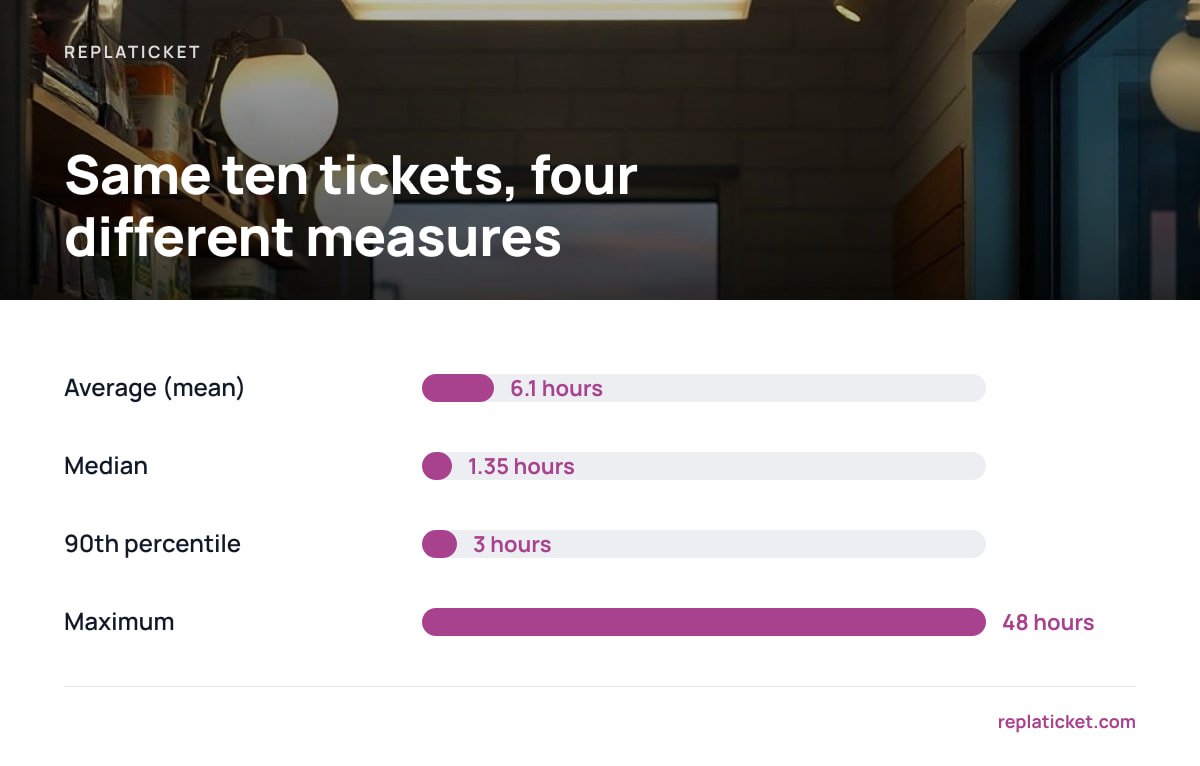
Here are ten tickets from a week, with first-reply times in business hours: 0.5, 0.7, 1, 1, 1.2, 1.5, 2, 2, 3, and 48. The 48-hour ticket was misfiled into a spam folder.
| Measure | Result | What it tells you |
|---|---|---|
| Average (mean) | 6.1 hours | Distorted by one lost ticket |
| Median | 1.35 hours | What a typical customer experienced |
| 90th percentile | 3 hours | How slow your slow-but-normal tickets are |
| Maximum | 48 hours | A process failure worth investigating |
Nine customers out of ten heard back within three hours, yet the average says six. If you set targets on the average, you will chase a number that one outlier controls.
Report three figures: the median for typical experience, the 90th percentile for consistency, and a list of every breach so you can see the individual tickets that went wrong. The breaches are where the useful lessons are. A 48-hour ticket usually points to a routing gap, a filter rule, or a store inbox nobody was watching.
Pro Tip: Exclude spam, duplicates, and merged tickets from your FRT before you calculate anything. Leave them in and you get two bad outcomes at once. Instant "replies" to spam make you look fast, and forgotten duplicates make you look slow. Clean the data first, then measure.
Realistic First Response Time Targets for a Small Store Team
There is no universal standard for first response time. Service management frameworks such as ISO/IEC 20000-1 require you to agree service levels and monitor performance against them. They leave the actual numbers to you. That is the right approach. Your targets should come from what each type of ticket costs you when it waits.
These are the targets we would set for a one-to-three-person team running email support for one or a few online stores:
| Ticket type | First-reply target | Why this number |
|---|---|---|
| Pre-sale question (sizing, stock, compatibility) | 1 business hour | The buyer is deciding right now and has other tabs open |
| Order problem (damaged, wrong item, missing) | 4 business hours | They have already paid and are anxious |
| Returns and refunds | 4 business hours | Slow replies here turn into payment disputes |
| "Where is my order?" | Same business day | Often solved with a tracking link, but silence feels like theft |
| Wholesale, partnerships, general | 1 business day | Important but rarely urgent |
The pre-sale target is the aggressive one, and it should be. A Harvard Business Review study of online lead response audited 2,241 U.S. companies and found that a quick reply made a dramatic difference. Firms that tried to contact a lead within an hour were far more likely to have a meaningful conversation than firms that waited longer.
Firms that responded within an hour were nearly seven times as likely to qualify a lead as those that waited even one hour longer, and more than 60 times as likely as those that waited 24 hours or more.
A shopper asking whether a jacket runs small is a lead. Answer them next week and they have already bought elsewhere.
If you cannot staff a 1-hour pre-sale target, do not publish one. A 4-business-hour promise you keep beats a 1-hour promise you miss half the time.
Why the First Reply Matters More Than the Final One
First response time is not the same as resolution time, and you should track both. The first reply carries more weight than its size suggests.
It ends the uncertainty. Until someone replies, the customer does not know whether their message was received, read, or lost. The guidance in ISO 10002 on complaints handling puts prompt acknowledgment of a complaint near the start of the process for exactly this reason. A customer who knows a person has the case stops chasing.
It prevents repeat contacts. A customer who hears nothing sends a second email, then a social media message, then opens a payment dispute. Each one is another ticket for your team. Research behind the Harvard Business Review article "Stop Trying to Delight Your Customers" found that the effort customers have to spend getting an issue handled, including repeat contacts, is a strong driver of disloyalty. A fast first reply is one of the cheapest ways to cut that effort.
It can carry legal weight in e-commerce. If the first reply involves a shipping delay, U.S. rules apply. The FTC's Mail, Internet, or Telephone Order Merchandise Rule requires you to notify customers when you cannot ship within the time you stated, or within 30 days if you stated no time. You must also give them the option to accept the delay or cancel for a refund. A slow first reply to a "where is my order" email can leave you out of step with that obligation.
Speed is not the only thing that matters, though. A fast reply that says nothing useful just moves the wait to the second reply. Watch your satisfaction scores alongside FRT. Our guide to reading a CSAT score on a small team covers how to tell whether faster replies are actually landing well.
How to Cut First Response Time Without Hiring Anyone

Most small teams can bring their median FRT down without adding headcount. The delay usually comes from tickets waiting in the wrong place, not from people typing slowly.
Triage by ticket type, not by arrival order
First-in, first-out treats a pre-sale question the same as a wholesale inquiry. Sort incoming tickets by type and work the tight-target types first. A simple required dropdown on your contact form ("Question before buying," "Problem with my order," "Return or refund") does most of this sorting for you.
Collect the order number up front
The most common wasted first reply is "Can you send your order number?" Make the order number a required field for order-related contact reasons. Your first reply can then contain an actual answer.
Write replies for your top five questions
Pull your last 100 tickets and count the reasons. In most stores, five reasons cover well over half the volume. Write a solid saved reply for each one, and personalize the first line before sending.
Get warned before a ticket breaches
A report showing yesterday's breaches is too late for those customers. Set a warning when a ticket reaches about 75% of its target. With a 4-hour target, that is the 3-hour mark, while there is still time to act.
Stop working from a personal inbox
If tickets arrive in someone's Gmail and get forwarded around, nobody can see what is waiting or for how long. Our piece on when a shared inbox stops working covers the point where forwarding and labels can no longer show you response times.
Tracking First Response Time Across Several Stores

If you run more than one store, a single blended FRT hides the store that is struggling. A fast flagship with high ticket volume can mask a small side store where tickets sit for a day.
Set targets per store. A store selling made-to-order furniture can live with a slower pre-sale target than one selling phone cases, where buyers decide in minutes.
Report per store and per person. If one store's median FRT is three times the others, check who has access to it. Often only one person can see that inbox, and that person was on holiday.
Keep one queue, separate identities. Customers should get replies from the store they bought from, with that store's name and address. Your team should work from one list sorted by deadline. Our guide to running multiple Shopify stores without drowning in support walks through that setup in detail.
Set First-Reply Targets Per Store and Get Warned Before You Miss Them, for $299 Once
Everything above depends on a few things. You need one queue across your stores, a first-reply target per ticket type, a warning before a breach, and reports split by store and by person. Replaticket does exactly that. It pulls tickets from all your stores into one inbox, and each store keeps its own reply name, address, and color. You can set SLA targets for both first reply and resolution, and the software warns you as tickets approach them. Reports show FRT and satisfaction per store and per person. You also control which team members can see which stores.
It costs $299 once. That includes complete source code, 12 months of updates, and 30 days of setup support, with no per-agent fee when you add seasonal help. The honest caveat is that it is self-hosted. You need a server and someone comfortable maintaining it. Before you publish a response promise to customers, check our documentation on how the SLA clock handles out-of-hours time. Do the same for any tool you consider.
Frequently Asked Questions
What is a good first response time for email support?
For a small online store, a first human reply within 4 business hours is a solid general target for email. Pre-sale questions deserve a tighter target of about 1 business hour, because the buyer is deciding right now. Set targets by ticket type rather than using one number for everything.
Does an automatic reply count toward first response time?
No. An auto-acknowledgment confirms receipt but does not answer the customer. If you count it, your first response time will look near-instant while customers still wait. Measure the first reply written by a person that addresses the question.
Should first response time be measured in business hours or calendar hours?
Use business hours for the targets your team is judged against, since nobody can reply outside working hours. Track calendar-hour first response time separately, because it shows what customers actually experience. A large gap between the two points to a coverage problem, not a speed problem.
What is the difference between first response time and resolution time?
First response time measures how long a customer waits for the first human reply. Resolution time measures how long it takes until the issue is fully solved and the ticket closed. A team can be fast on one and slow on the other, so track both.
Why use the median instead of the average for first response time?
Response times have a long tail, so one ticket left for two days can pull the average far above what most customers experienced. The median shows the typical wait, and the 90th percentile shows how consistent you are. Review breached tickets individually to find the process gaps behind them.
Sources
- The Short Life of Online Sales Leads | Harvard Business Review
- Stop Trying to Delight Your Customers | Harvard Business Review
- ISO 10002:2018 Quality management — Customer satisfaction — Guidelines for complaints handling in organizations | International Organization for Standardization
- ISO/IEC 20000-1:2018 Information technology — Service management — Part 1: Service management system requirements | International Organization for Standardization
- Business Guide to the FTC's Mail, Internet, or Telephone Order Merchandise Rule | U.S. Federal Trade Commission
Leave a Reply