

A support inbox is the single queue where every customer email, chat, and contact-form message lands so your team answers from one place instead of juggling logins. The distinction that matters once you run more than one store is whether that inbox keeps each brand's reply name, address, and reporting separate while still pooling the agents who answer — most tools force you to pick one or the other.
TL;DR:
- A shared support inbox pools tickets from every store into one queue, but only some tools keep each brand's reply name and address distinct inside that queue.
- Per-agent subscription pricing can push a two-store, five-agent team past $1,100 a year, and the bill climbs every time you add a seat.
- SLA targets only help if the inbox tracks first-reply and resolution time per store, not just for the account as a whole.
- Self-hosted inboxes keep ticket data and customer emails on a server you control, which matters under rules like GDPR.
- ReplaTicket charges one $299 license instead of a monthly per-agent fee, and ships with the source code so you own the install.
Table of Contents
- What a Multi-Store Support Inbox Has to Do Differently
- Shared Queue vs. Separate Mailboxes: The Trade-off Nobody States Plainly
- What a Per-Agent Support Inbox Actually Costs as You Add Stores
- Permissions, SLA Targets, and Reports: The Three Things to Check Before You Buy
- Self-Hosted vs. Cloud: Where the Ticket Data Actually Sits
- Setting Up Multi-Brand Replies Without Breaking the From Address
- Run Every Store From One Support Inbox You Pay for Once
- Frequently Asked Questions
- Sources
What a Multi-Store Support Inbox Has to Do Differently

A single-store inbox only has to do one job: collect messages and let agents reply. A multi-store support inbox has to do that and keep the stores from bleeding into each other. A customer who emails support@brand-a.com should get a reply that comes from brand-a.com, signed with brand A's name, not a generic "Support Team" that could belong to any of the five storefronts you run.
Most help desks built for a single business treat "brand" as a label you add to a ticket, not as a property of the inbox itself. That works until a customer notices the reply came from the wrong address, or an agent answering for brand B accidentally pastes in brand A's return policy. The inbox needs to carry the store's address, reply name, and even a color tag through the whole conversation, automatically, without anyone remembering to set it.
If you're already splitting your attention across several Shopify storefronts, the ticket volume problem usually shows up before the brand-mixing problem does — our guide to running multiple Shopify stores without drowning in support covers the staffing side of that in more detail.
Shared Queue vs. Separate Mailboxes: The Trade-off Nobody States Plainly
You have two real options, and vendors rarely say this part out loud. Option one: give each store its own mailbox and its own agent login, which keeps brands cleanly separated but means you're paying for and managing multiple tools, or multiple seats in the same tool, per store. Option two: merge everything into one shared support inbox, which lets a small team cover several brands without duplicating headcount, but only works if the software preserves per-store identity on the way out.
Small teams almost always need option two. A two-person support team covering three stores can't justify three separate logins, three separate SLA clocks, and three separate report exports. The deciding question isn't "can it merge the tickets" — nearly everything can. It's "can it merge the tickets without merging the brands."
Pro Tip: Before you consolidate stores into one inbox, check your SPF and DKIM records for each sending domain separately. A shared inbox can route and reply correctly and still land in spam, because email authentication is set per domain, not per help desk — merging the inbox doesn't merge the DNS work.
What a Per-Agent Support Inbox Actually Costs as You Add Stores

Subscription help desks almost all price by agent seat, typically somewhere between $19 and $49 per agent per month depending on the plan tier. That number looks small on a pricing page and gets painful fast once you're staffing more than one store's worth of tickets, especially during a seasonal peak when you add two temporary agents for six weeks and forget to remove them in month seven.
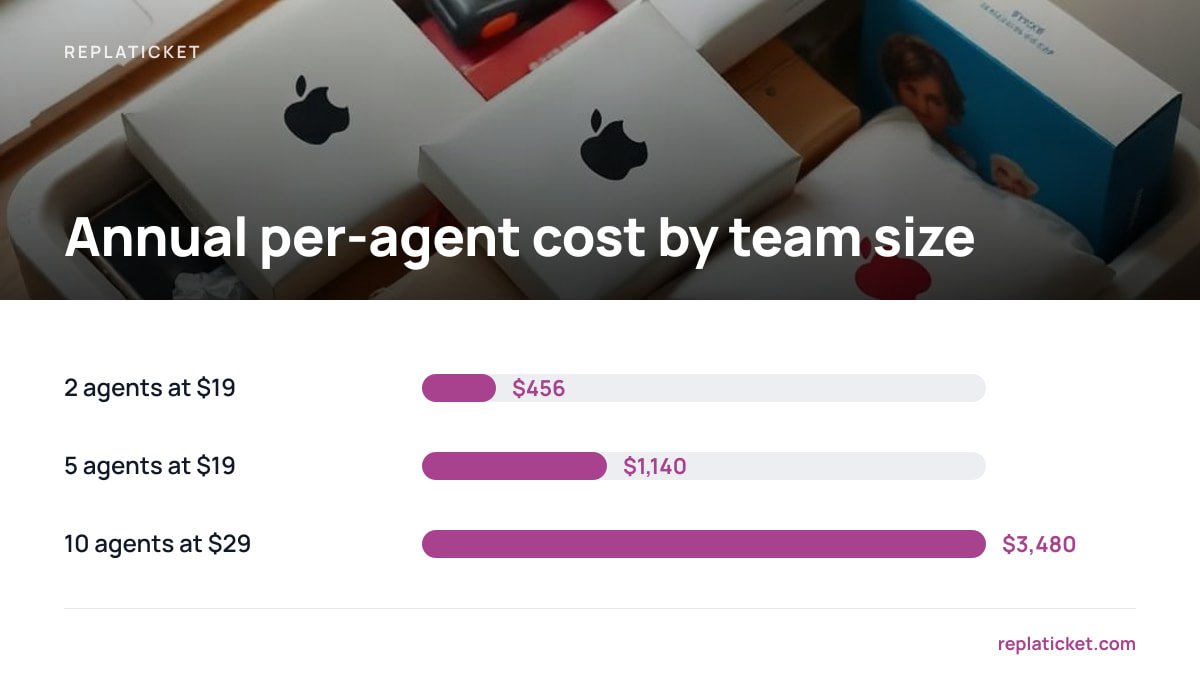
| Agents | Illustrative price/agent/month | Monthly total | Annual total |
|---|---|---|---|
| 2 | $19 | $38 | $456 |
| 5 | $19 | $95 | $1,140 |
| 10 | $29 | $290 | $3,480 |
One $299 license costs less than four months of a five-agent plan at $19 a seat — and after that, there's no renewal.
The table above is illustrative, not a quote from any one vendor, but the shape holds across the category: cost scales with headcount, not with the number of stores you're supporting. If you want the exact math on one widely used platform, we break it down in what a small store team actually pays per year for seat-based support software. The pattern that catches people off guard is covered in what to check before your help desk bill goes up — plan changes and seat minimums tend to arrive quietly, usually at renewal.
Permissions, SLA Targets, and Reports: The Three Things to Check Before You Buy
Who Can See Which Store's Tickets
Per-person store access is the feature that makes a shared inbox safe to use with contractors or seasonal hires. You want to grant someone access to brand A's queue without handing them brand B's customer list, refund history, or email addresses. If a tool can't scope access below "full account" or "nothing," you're stuck either over-trusting a temp hire or keeping them out of the shared inbox entirely, which defeats the point of consolidating in the first place.
Whether SLA Targets Are Tracked Per Store
An SLA target that applies to the whole account tells you almost nothing useful. A first-reply target of four hours might be comfortably met on your biggest brand and blown every week on the smaller one nobody's watching closely. The inbox needs to track first-reply time and resolution time separately for each store, and warn you before a ticket breaches the target, not after a customer has already left a one-star review.
Whether the Reports Separate Out Each Brand
Reporting is where multi-store support either proves its worth or quietly wastes your time. You want a per-store report you can hand to that store's owner or a contractor, showing ticket volume, response time, and a satisfaction score, without them wading through data from brands they don't run. If you're trying to figure out what that satisfaction number should even look like on a small team, our explainer on calculating and reading CSAT score walks through the math and the realistic benchmarks.
Self-Hosted vs. Cloud: Where the Ticket Data Actually Sits
Every support ticket contains a customer's email address, order history, and sometimes payment or shipping details. A cloud help desk stores that on the vendor's servers, which means the vendor is a data processor acting on your behalf. Under the General Data Protection Regulation, Article 28 requires a written contract whenever that happens, and you're still the one accountable if that processor mishandles the data. The UK Information Commissioner's Office guidance on data protection is explicit that outsourcing storage doesn't outsource responsibility.
A self-hosted support inbox sidesteps that layer entirely: the data lives on a server you control, under whatever security baseline you choose to apply. The NIST Cybersecurity Framework is a reasonable starting checklist for securing that server yourself — patching, access control, backups — since self-hosting trades a vendor's security team for your own responsibility. That's a real trade-off, not a free win: if you're not willing to apply basic server hygiene, a well-run cloud vendor's infrastructure may genuinely be safer than a neglected self-hosted box.
Setting Up Multi-Brand Replies Without Breaking the From Address
The part that trips up most multi-store setups isn't the inbox software — it's the outgoing email. The FTC's CAN-SPAM compliance guide requires that the "From," "To," and routing information on a commercial email accurately identify the sender, which means a reply claiming to be from brand A's support address actually has to originate from, or be authorized to send as, that address. If your help desk sends every reply through one shared domain regardless of which store the ticket came from, you're technically misrepresenting the sender on every message.
The fix is to configure each store's inbound address, outbound reply name, and sending domain as a distinct set, not as one shared default with a label slapped on top. Any multi-store support inbox worth buying should let you set this per store once and then forget about it — the agent just hits reply, and the correct identity goes out automatically.
Article 28 of the GDPR requires a written processing contract any time a third party stores personal data on your behalf — a cloud help desk is that third party.
For a broader look at how the one-time-license model stacks up against monthly subscriptions across the whole category, see subscription vs. one-time payment help desk software, compared.
Run Every Store From One Support Inbox You Pay for Once
ReplaTicket is a self-hosted help desk you install on your own server for a one-time $299 payment, built specifically around the multi-store problem this article has been describing. It pools every store's tickets into one shared inbox while keeping each store's reply name, address, and color distinct, adds per-person store access so a seasonal hire only sees the brand they're supporting, and tracks SLA targets and satisfaction reports per store instead of blending them into one account-wide number.
The license includes the full source code, 12 months of updates, and 30 days of setup support. The honest caveat: you're responsible for your own server, backups, and basic security hygiene, since there's no vendor infrastructure team behind it — check the spec sheet against your own hosting setup before you buy, and if that trade-off doesn't suit you, a managed cloud help desk is still the better fit.
Frequently Asked Questions
What's the difference between a shared support inbox and a shared mailbox?
A shared mailbox is just one inbound address multiple people can log into, with no concept of which brand a message belongs to. A shared support inbox adds ticket tracking, assignment, SLA timers, and — for multi-store setups — the ability to keep each store's reply name and address separate even though agents work from one combined queue.
Can a multi-store support inbox stop customers from seeing other brands' tickets?
Yes, if it supports per-person store access permissions, which scope what each agent can see to only the stores they're assigned to. Without that feature, every agent with inbox access can see every brand's full ticket history, which is a real risk when you're working with contractors or seasonal staff.
Does a self-hosted support inbox need its own security setup?
Yes. Self-hosting means you're responsible for server patching, backups, and access control instead of a vendor's security team, so following a baseline like the NIST Cybersecurity Framework is worth the afternoon it takes. The trade-off is that your customer data never leaves a server you control.
How much does a subscription support inbox cost for a five-agent team?
At a common per-agent price of roughly $19 a month, five agents run about $1,140 a year, and that figure climbs every time you add a seat or upgrade a plan tier. A one-time-license tool avoids that recurring cost entirely but shifts hosting and maintenance onto you.
Do I need separate SLA targets for each store in a multi-store inbox?
You should, because an account-wide SLA average can hide a smaller brand's response times slipping badly while a bigger brand's performance pulls the average back up. Per-store SLA tracking with its own warnings is the only way to catch that before a customer complains.
Sources
- CAN-SPAM Act Compliance Guide for Business | Federal Trade Commission
- General Data Protection Regulation (GDPR) Full Text | GDPR.eu
- Guide to Data Protection | UK Information Commissioner's Office
- NIST Cybersecurity Framework | National Institute of Standards and Technology
Leave a Reply