

Zendesk cost starts at about $19 per agent per month for basic ticketing. The full Suite plans list at roughly $55, $115 and $169 per agent per month when billed annually. What matters more is the yearly total, not the sticker price. Every person who answers tickets needs a seat, every seat bills every month, and add-ons stack on top. For a small team, that adds up faster than most owners expect.
TL;DR:
- Zendesk bills per agent per month, so your cost grows with every person who answers tickets, including part-time and seasonal staff.
- At list price with annual billing, three agents on the entry Suite plan cost about $1,980 a year before any add-ons.
- AI add-ons and automated-resolution charges sit on top of seat prices and can raise the bill sharply.
- Annual billing lowers the per-seat rate, but on many contracts it also locks your seat count in until renewal.
- Per-agent pricing makes sense for teams that need phone, chat and AI in one hosted product. A small email-first store team usually pays for features it never uses.
Table of Contents
- Zendesk Cost Per Agent, Plan by Plan
- Annual vs. Monthly Billing: The Discount That Locks You In
- The Add-Ons That Push the Real Bill Higher
- Zendesk Cost Over Three Years for a Small Store Team
- Seasonal Teams: Where Per-Agent Pricing Hurts Most
- The Cost You Don't See on the Invoice: Data and Lock-In
- When Paying Per Agent Is Worth It, and When It Isn't
- Stop Paying Per Seat for a Shared Inbox Your Team Already Understands
- Frequently Asked Questions
- Sources
Zendesk Cost Per Agent, Plan by Plan

Zendesk prices almost everything per agent, per month. An agent is anyone who replies to customers. That includes you, your business partner, and the contractor who helps out in December. The Zendesk pricing page lists its plans this way. The rates below are list prices with annual billing at the time of writing. Check the page before you budget, because these numbers change.
| Plan | List price (per agent/month, billed annually) | What it's built for |
|---|---|---|
| Support Team | ~$19 | Basic email ticketing |
| Suite Team | ~$55 | Email, chat, social and help center in one place |
| Suite Professional | ~$115 | Adds more reporting, SLAs and customization |
| Suite Enterprise | ~$169 | Larger teams with complex workflows and controls |
The jump from basic ticketing to the Suite is the one that catches small stores. Features like SLA targets and deeper reporting tend to live on the middle and upper tiers. If you need them, your per-seat price can be six times the entry rate.
Annual vs. Monthly Billing: The Discount That Locks You In
Billing monthly costs more per seat than billing annually. That gap pushes most small teams onto an annual contract. The trade-off is flexibility. On many annual subscriptions, extra seats are added and prorated right away, but seats you remove only drop off at renewal.
This matters most if your team size moves. Suppose you add two seasonal agents in November on an annual plan. You may keep paying for those seats long after the holiday rush ends. Read the seat-reduction terms in your agreement before you add anyone. Our guide to help desk plan changes covers what to check before a renewal or price change hits your bill.
The Add-Ons That Push the Real Bill Higher
The plan price is the floor, not the total. Several costs sit outside the per-seat rate.
AI agent assistance
Zendesk sells advanced AI features for agents as a per-agent add-on. That add-on has listed at around $50 per agent per month, which nearly doubles the cost of a Suite Team seat. If you turn it on for three agents, you add about $1,800 a year.
Automated resolutions
AI that answers customers without a human is metered by the resolution, not by the seat. Each plan includes some, and usage above that is billed on top. This is the hardest line to forecast, because it rises with your ticket volume, not your headcount.
More brands and more stores
If you run more than one store, check which tier supports multiple brands before you add your second one. Multi-brand features are often tied to higher plans. That can force an upgrade for every agent, not just the ones who handle the new store.
Extra people who only need to look
Managers, warehouse staff and finance people often need to read a ticket without replying. Some help desks offer cheaper view-only seats, but they may be limited to certain tiers. Find out before you give a full seat to someone who only checks order notes.
Zendesk Cost Over Three Years for a Small Store Team
Monthly figures hide how much you spend. Multiply by seats and by 12, then by the number of years you expect to stay. Most teams stay longer than they planned.
| Team setup | Per year (list, annual billing) | Over 3 years |
|---|---|---|
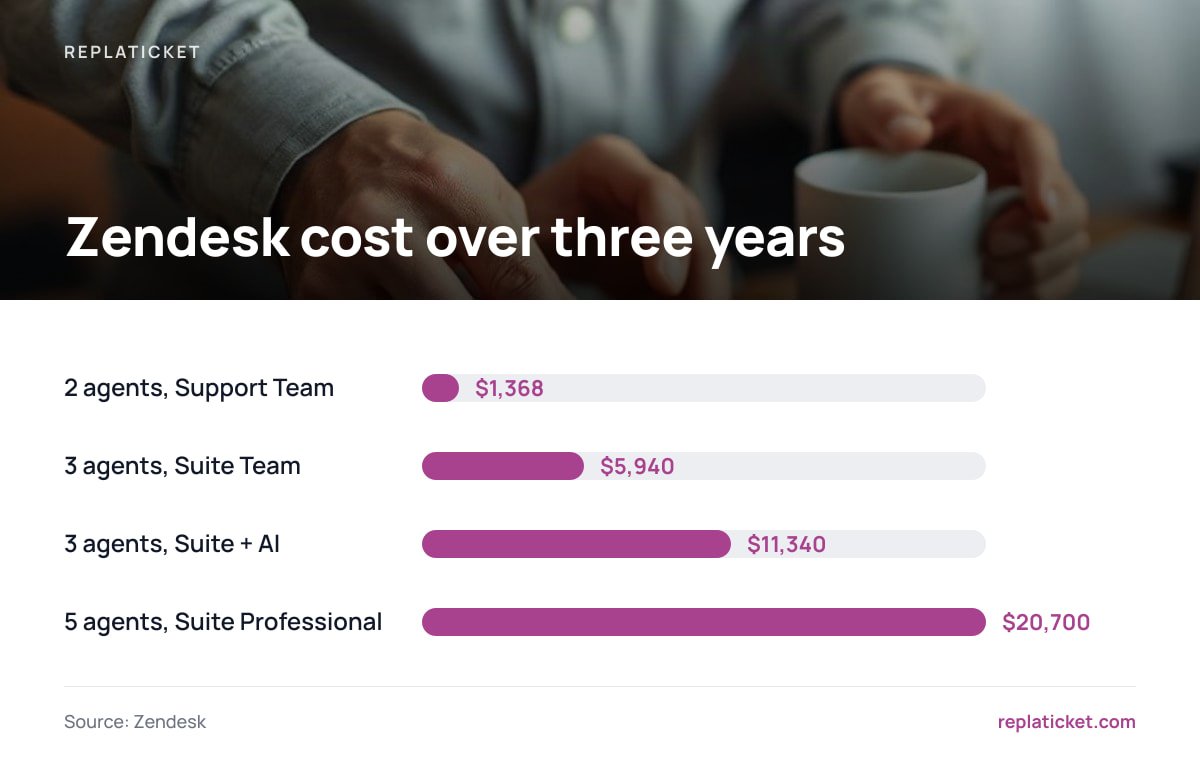
| 2 agents, Support Team ($19) | $456 | $1,368 |
| 3 agents, Suite Team ($55) | $1,980 | $5,940 |
| 3 agents, Suite Team + AI add-on ($105) | $3,780 | $11,340 |
| 5 agents, Suite Professional ($115) | $6,900 | $20,700 |
These totals assume prices stay flat for three years, which is optimistic. They also leave out automated-resolution overages and any seats added for peak season.
Three agents on the entry Suite plan come to $1,980 a year before a single add-on, and $5,940 over three years.
The cheapest row looks harmless. The catch is that the cheapest plan rarely stays the plan. Once you need SLAs, better reports or a second brand, you move up a tier, and every seat moves with you. For a side-by-side look at how this compares with paying once, see subscription vs. one-time help desk software.
Seasonal Teams: Where Per-Agent Pricing Hurts Most

Online stores rarely have steady support volume. A store might need one person in March and four in late November. Per-agent pricing charges you for your peak headcount, and an annual contract can stretch that peak across the whole year.
Here is how the math plays out. Three extra Suite Team seats for a six-week holiday rush cost about $165 a month at list price. If those seats can't be removed until renewal, they cost $1,980 for the year. You pay for 52 weeks of help you used for six.
Pro Tip: Set your contract's renewal date for the weeks just after your busiest season, not on the day you first signed up. If your contract only lets you cut seats at renewal, a January renewal lets you drop holiday seats right away. A renewal in early November locks them in for another full year.
The Cost You Don't See on the Invoice: Data and Lock-In
A hosted help desk keeps your customer conversations on the vendor's servers. That is convenient, but it has a compliance side. Under Article 28 of the GDPR, a provider that processes personal data for you is a processor. You need a written contract with it that covers how it handles that data. The rules reach further than many US store owners assume. The European Commission's data protection guidance makes clear that EU rules can apply to businesses outside the EU that offer goods to people in the EU.
The other hidden cost is switching. Years of ticket history, macros and customer notes live in the vendor's format. Leaving means exporting, mapping and re-importing all of it. That effort is real, and it quietly keeps teams paying long after the plan stops fitting.
When Paying Per Agent Is Worth It, and When It Isn't
Per-agent pricing is the right call in some cases. It fits if you need phone, live chat, AI deflection and a help center in one hosted product, with no server to manage. It also fits a team of 20 or more with steady volume and a budget that can absorb a few thousand dollars a year per tier change.
It is the wrong call for most small e-commerce teams. If most of your support happens over email and your team is two to five people who grow in Q4, you are renting features you don't use. You pay for those features again every month. For that team, we would pick a one-time license on your own server. The math in the three-year table is the reason.
Whatever you pick, measure whether it works. Track response times and your CSAT score so you're judging the tool by results, not by its feature list.
Stop Paying Per Seat for a Shared Inbox Your Team Already Understands
Replaticket is a self-hosted help desk you buy once for $299. It runs on your own server. It pulls tickets from all your stores into one inbox, and each store keeps its own reply address, reply name and color. You get SLA first-reply and resolution targets with warnings, store access set per person, and reports by store and by person, including a satisfaction score. Add a seasonal helper in November and your bill stays at $299.
The license includes the complete source code, 12 months of updates and 30 days of setup support. The honest limit: you need a server and someone willing to look after it. There's no built-in phone line or metered AI bot. If your support is mostly email across a few stores, that trade is usually worth it. If it isn't, check our feature list against your needs before you buy.
Frequently Asked Questions
How much does Zendesk cost per month for one agent?
At list price with annual billing, basic ticketing starts around $19 per agent per month, and the Suite plans list at roughly $55, $115 and $169 per agent per month. Monthly billing costs more per seat. Check the current pricing page before you budget, because rates change.
Does Zendesk charge for every user or only agents?
Pricing is per agent, meaning each person who replies to customers needs a paid seat. People who only need to read tickets may qualify for cheaper view-only access on some tiers. Confirm what your plan includes before you hand out full seats.
What is the real yearly cost of Zendesk for a small team?
Multiply the per-seat price by your number of agents and by 12. Three agents on the entry Suite plan come to about $1,980 a year at list price, before AI add-ons or automated-resolution charges. Adding an AI add-on at around $50 per agent can nearly double that.
Can I remove agent seats after peak season?
It depends on your contract. On many annual subscriptions, added seats are prorated right away, but reductions only take effect at renewal. Read the seat terms before you add seasonal staff, and consider timing your renewal for just after your busy season.
Is a one-time-payment help desk cheaper than per-agent pricing?
For small, email-first teams, usually yes. The gap grows every year you stay. A one-time license avoids recurring seat fees, but you take on hosting and upkeep yourself. Teams that need hosted phone, chat and AI in one product may still find per-agent plans a better fit.
Sources
- Zendesk Pricing | Zendesk
- Art. 28 GDPR – Processor | gdpr-info.eu
- Data protection | European Commission
Leave a Reply